Thursday, 26 January 2017

Portfolio

Charlie Long - Game Art Portfolio


Since a young age I have held a keen interest in video games and how they work, for the past few years I have been working on developing my drawing and digital skills in order to create pieces of work that can one day be used in a game.

As of the past year (2016-2017) I have been working on a project to create a 3D game for my college using software such as Photoshop, Maya 2016, unreal engine 4.12.5 and Autodesk mudbox. Here is some of the design process ranging from a few pieces of concept art to fully created digital objects:

Perspective Drawing


Killer Klownz From Outer Space Project

Concept Art


Digital Work - Killer Klownz Game


Random Doodles/Other Projects


Spaceship Project

Concept Art


Wednesday, 25 January 2017

Unit 66 - 67 3D Modelling Assignment 3 – Be able to create 3D models following industry practice


Human Character Model


In order to start the creation of a 3D model a reference image is needed to help construct a model with respective proportions that are realistic, and therefore an image plane is created which provides the modeller to have a 2D image on the Maya workstation that they can work off of. Here you can see my image plane as a reference, created by going into the create tab and adding a photo from file that i had already collected.

Using a cylinder polygon and adding subdivisions to turn it into a octagonal cylinder which is much easier to work with. After doing this i then matched up the outline of the polygon to the reference image to get the correct height for the torso.


Using the scale and move tool i then moved each row of vertices of the octagonal cylinder to match up to the dimensions of the reference image, this forming the torso of the character.


Once the torso was finished I then moved onto the arm, which was done using the same method as the torso, yet being resized to match up to the reference images proportions. The only difference with the arm and the torso in terms of being a polygon other than the scale, is the added two rows of vertices to allow for the arm to be more detailed.


Next i made sure that the arm was in the correct place, and deleted the top row of faces from it, this is where the shoulder would normally be. However in order to connect the arm to the shoulder you have to extrude the faces from the side of the torso to create the shoulders and something for the arm to connect to.


Here is the faces of the torso being extruded to their position. By extruding the faces twice, it creates enough verts for their to be a perfect match up between the arm and the torso/shoulder.


I then combined the meshes together once in place to turn them into the same object, but then however used the welding tool to add the vertices of the arm on the top to the bottom vertices of the shoulder in order to connect them as one object.


As you can see here i have also resized the shoulder so that it has the realistic proportions like the image reference. This was done by using the move tool and moving the vertices on top of the shoulder to the correct area, also rounding off the top of the shoulder.

Once i had completed the arm, i moved onto the leg which again was created in the same was as the torso and the arm, using a move tool to match up the vertices to the image reference.


You can see here i connected the leg to the lower portion of the torso, thus forming the pelvic region. This was again done in the same way as i connected the arm to the shoulder, using the welding tool.


After finishing the leg i decided to mirror the body so that i could see a full body, a trick used to make sure that the left and right side of the body are symmetrical without having to make both sides separately.  To do this i went into the mesh tab and chose mirror geometry whilst having my mesh selected.


Here is the mirrored piece, sometimes you may have to adjust the geometry however as it does not always match up to the reference image.


Once i had mirrored my body i then started work on the hand, which is made from a square re-scaled and having 4 subdivisions in height and weight to allow me to extrude the fingers from the faces.


After extruding the fingers on the hand i then matched it up to my reference image as best as possible ready to connect it to the arm/body.


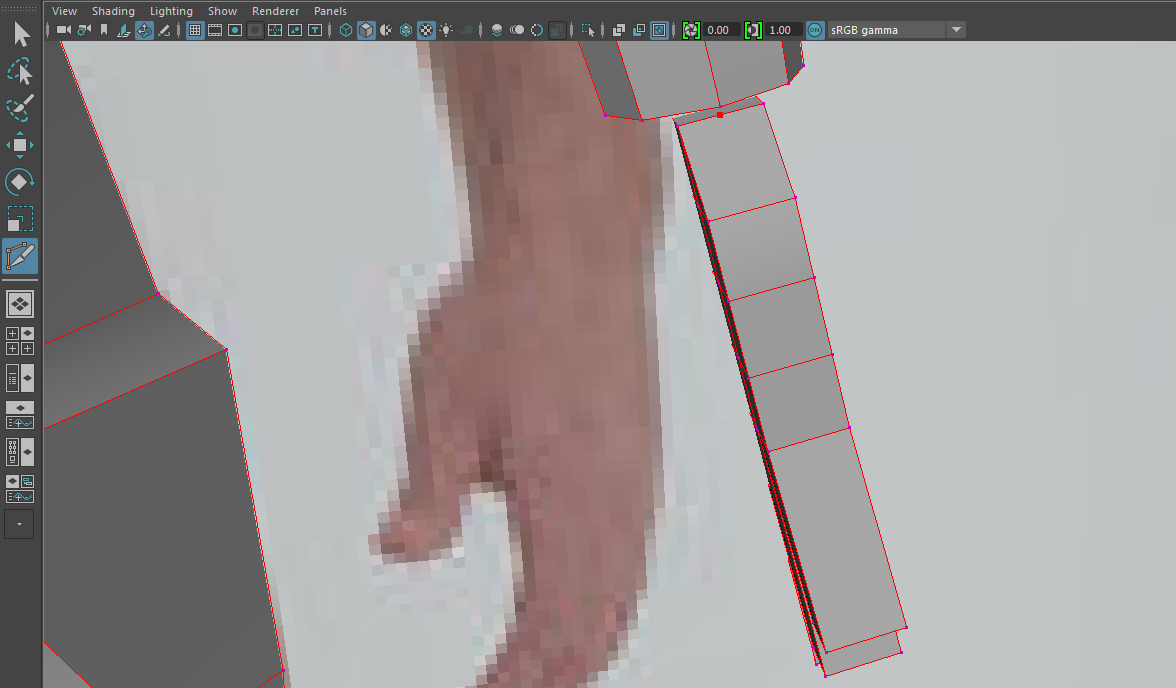
 By adding another vertex using the bevel tool i was able to connect the hand to the arm like i connected the other body parts, using the weld tool.


 The same was also done with the feet, modelling them off of a square that i had extruded at the ends in order to create the toes then elongated in order to produce some long clown feet.
For the head i used a cylinder like i used for the torso, however moulded it by extruding the faces at the bottom to create a long chin, with the head however one i had connected it and was done, turned it along with the rest of the body into a smooth mesh, this making the model look a lot better as it has the realistic smooth texture/sculpt that a human would have.


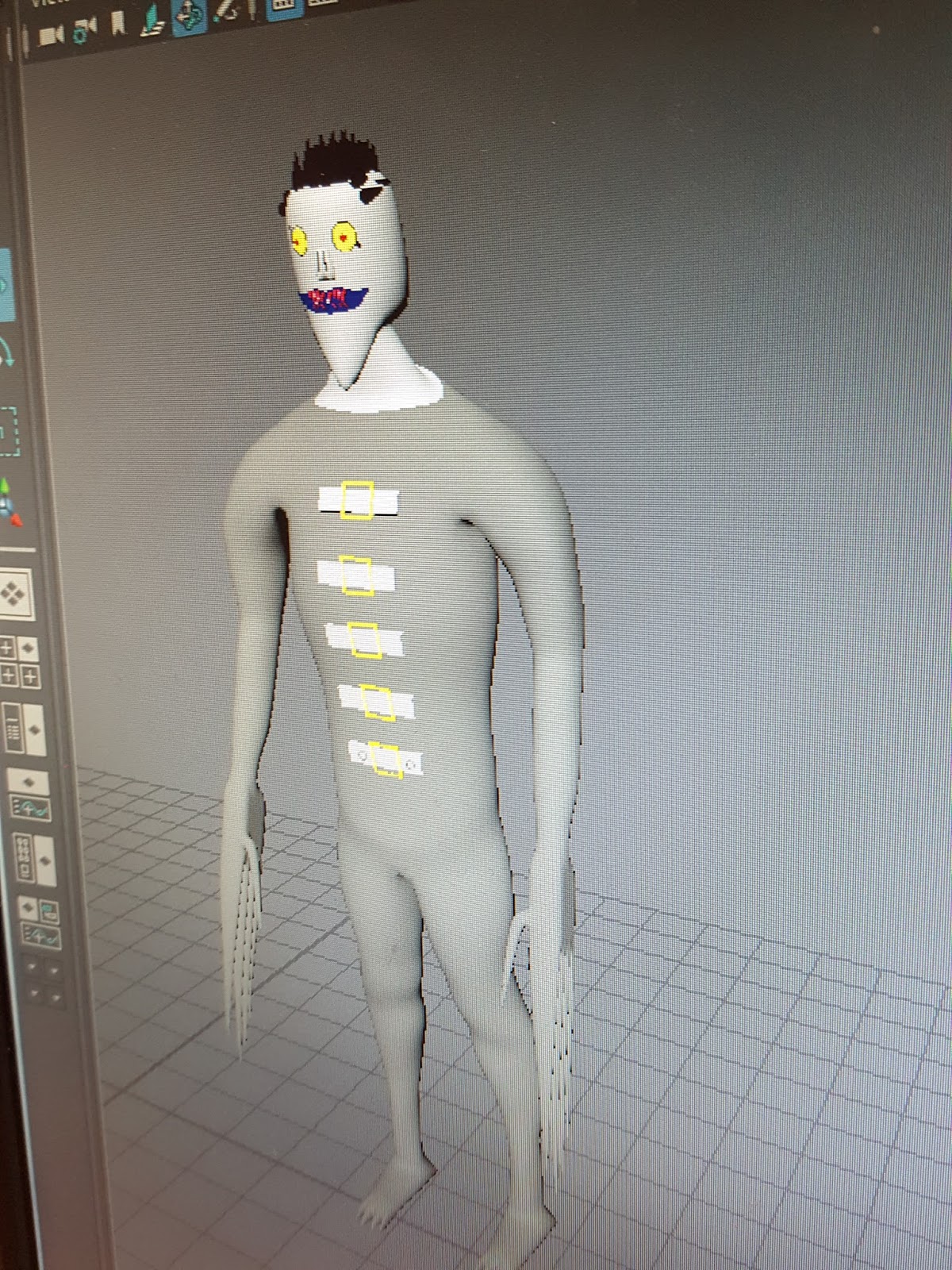
The final product that I ended up with was a clown that will be used in my game, i have elongated his fingers to simulate knives and also placed him in an orange jumpsuit to represent him being a prisoner that was once human, but has since been turned into a psychopathic clown who is on a murderous rampage. I am happy with how the initial model turned out, as it replicated the look i aimed for. I wanted to create a large lanky clown, that would tower over the normal player, in order to do this i raised his height in comparison to the initial reference image to make sure he was tall with the scale tool. The structure of his head represents a typical clown look, through the extrusion of his chin making it longer than that of a normal person. The art style is cel shaded like my game and was done through changing the colours on the specific faces of the model, such as the torso/arms, hands, head and feet to create the clear sections of his clothing. If i was to re do this character i would most likely spend more time on his head, as that is the most basic part of the model and does not have too much detail. Adding more detail would overall improve the model and make it look more realistic.


Friday, 25 November 2016

Unit 69 - Concept art explained

Unit 69 - Concept art explained

Concept art is the beginning process of creating a game, it allows the creator to try out various ideas and come up with new ideas that they can then use to model their characters off. Concept art can be in the form of a game environment, character or weapon/objects that will be in the game.

Concept is also used for movies, tv shows or cartoons in order to establish what a character looks like, from raw ideas, allowing a visual representation of the idea to come to life and give a physical presence to it.

Environment:


Here is some environment concept art, from this creators are able to have a visual representation of an idea, and are able to use this to create the 3D environment in which the game will be created. Not only is concept art used for the creation of a game, but also the marketing of a game, as it can be used before the game has been created in order to create a want for the game and give people a visual representation of the game giving them something to look forward to.

From this example of concept art for the game Assassins creed you can see how in depth concept art can be. This example highlights the use of lighting in games, as you can see the light source provides light to the centre of this quarry to the right of the image, whereas heavy shadows are cast to the left. This adds depth to the image and allows for a more realistic bit of concept art.

Along with the lighting that is shown, the image also allows you to see the size of the character compared to the environment around him, this allowing the viewer to work out how large the cliff side should be in comparison with the player.

I like this concept art as it does well to establish the landscape and give an example of what kind of environment to expect in the game. The use of the ambient lighting coming from the top down to light up certain areas but not the whole landscape does well to add mystery, leaving me to wonder what is in the caves. What i dont like about this concept art however is that not much is going on, it does well to establish an isolated character but doesnt do well to advance what will be in the game other than a character and where he will be, instead of other characters or objects such as weapons.


Stages of Concept Art


Concept art does not always have colour, instead concept art goes through various stages before it has a final form. The first stages are early drawings that allow for the artist to get the ideas out of their head, this can be in the form of just one section of a character or a basic drawing of a weapon, as you can see from the image above on the far left is a drawing of part of the main character in rough sketch, non coloured. This gives an idea of what the character may look like and helps to establish a look for the character, over time this is then adapted and changed depending on the reaction to the first drawings. With the middle two images you can see various other ideas were considered, again in black and white however this stage has a dull body drawing which gives a perspective of height for the character, finally on the far right is the used image for the character, in full colour and detail. This is then taken and used to create the character from, as you can see he has elements from each of the previous drawings, but has been finely tuned to detail taking the best parts from each.


Concept Art can also be used to identify what parts there are on game vehicles, for example this image shows what the specific parts are on this vehicle and also allows the viewer to understand why or what they do. Again with this image the first one is an early stage of concept art that is just an outline in black and white, then it is turned into a coloured image, here it has a character next to the vehicle to give a sense of size.

This is good concept art as it shows not only what the vehicle is but has clear labels as to what is what, this will help the game creaters to model it properly, with each part of the vehicle being created for its purpose rather than just the look.


Weapons


Concept art can also be in the form of weapons for a game or film. Drawing out the weapons for a game or film also allows the visual representation of an idea for a game or film, it also allows for more detail into what goes into the game/film. As you can see from the image above of the gun concept art, you can see different variations of the same weapon. This is something concept art allows game creators to do, they are able to look at the different possible variations to something and see which looks the best, then they will go onto creating the favourite choice. This was something done often by the move franchise star wars.

I like this piece of art for the reason that it shows the different variations allowing for a choice to be made on which gun will be used, this will help the game creater most as it explores all of the options for the weapon, it also has the drawing of the moveable handle in the bottom left which like with the star wars vehicle allows the game creater to see the practical uses for the weapon and bring it to life.


Mood

Concept art not only allows for a visual representation of ideas, but also helps to create a mood and give the idea life. For example, this image here shows a vast landscape which is picturesqe, it does well to demonstrate perspective with the mountains in the background that show the distance of the area. The atmosphere you get when you see this image is of solidarity, one character in a lonely area showcasing that the game this is drawn for will be a large scale game with exploration being the main feature, this image also establishes the look of the game which seems to be large areas that are mountainous with green valleys. This builds hype for a game more than just hearing of the idea, another element of concept art.

Conclusion

In conclusion concept art is a key part to game creation, elements of concept art can be seen at every stage of game production ranging from the pre creation, creation and then marketing after the game has been created. It is a needed part to games as it helps a game gain life and gives the basic ideas an image/a face that can be used to create the main components of the game.


Image References

http://conceptartworld.com/artists/raphael-lacoste/ - raphael lacoste

https://www.google.co.uk/search?q=star+wars+concept+art&safe=active&espv=2&biw=1920&bih=974&source=lnms&tbm=isch&sa=X&ved=0ahUKEwjX2K_LisTQAhWrC8AKHa1qBt8Q_AUIBigB#safe=active&tbm=isch&q=star+wars+battlefront+concept+art+drawing&imgrc=Oj3Gx9E15O_IIM%3A

https://www.google.co.uk/search?q=concept+art&safe=active&espv=2&biw=1920&bih=974&source=lnms&tbm=isch&sa=X&ved=0ahUKEwjf6oethcTQAhWiKcAKHY3XCosQ_AUIBigB#safe=active&tbm=isch&q=concept+art+disney&imgrc=ANK20iYMXXnMdM%3A

Wednesday, 12 October 2016

Unit 66: 3D Modelling Unit 67: 3D Animation Unit 68: 3D Environments - james


Unit 66: 3D Modelling Unit 67: 3D Animation Unit 68: 3D Environments

3D Modelling

3D modelling is the creation of assets or objects using programs such as Maya, 3D studio max or cinema 4D, Using polygons in order to bend/shape/morph them into an intended object. Objects created using 3D modelling software can then be used for things such as TV, Film or Video games.

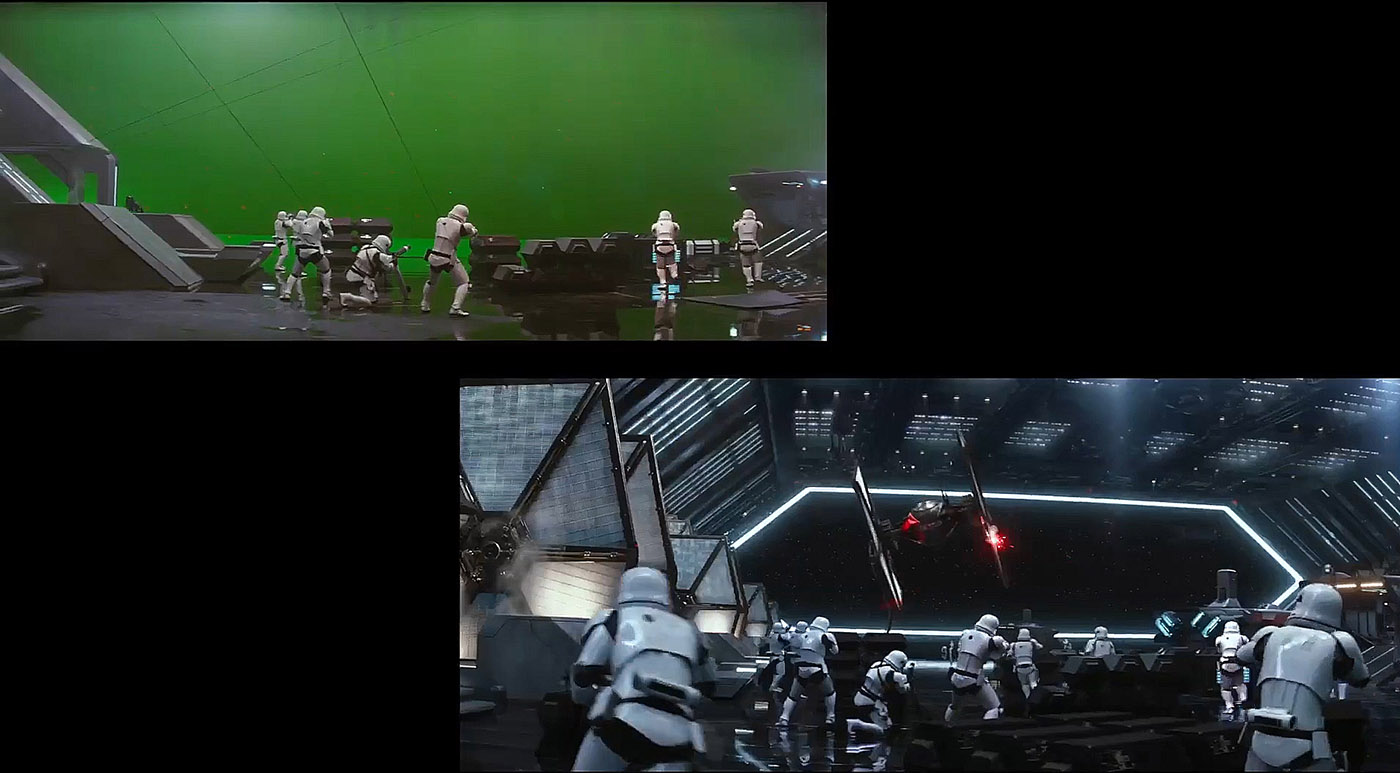
As mentioned 3D modelling has many applications, being very useful for providing the visual effects and CGI of most films and TV shows today, alongside being used to create game characters and objects. One film that uses 3D modelling is star wars, which utilises 3D modelling to create stunning realistic visual effects such as a lazer blast or a spaceship flying away.

Image result for star wars visual effects

Image result for Displaying 3D Polygons animations

As you can see from the image a green screen is used which allows for 3D modelled assets to be added later, such as the ship and the background, creating the illusion that it is really there when it is instead just a 3D model and not the real thing. Also you can see an image from the film Beowulf, an animated film that uses 3D modelling to create characters that mimic their voice actor counterparts.

3D modelling can also be used for educational purposes, for example if a model of a human body is created with the organs and bones in proportion to a real human it can be used to show medical students or kids the key areas of the human body, also being able to take a look at the organs in detail. The same can be said for a car, being able to take a car a part piece by piece virtually will allow mechanics to understand each part much easier, allowing them to see every piece of a car without having to work on a car, allowing them to practice.
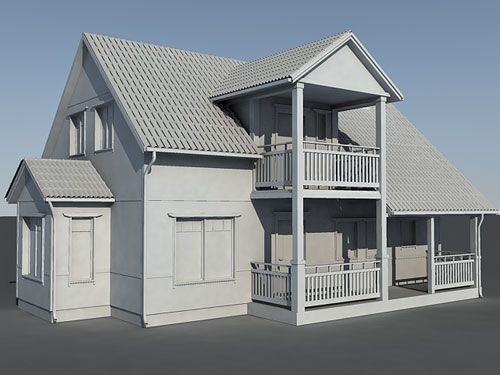
Another application for 3D modelling is architectural walkthroughs, which allow users to see a building in 3D virtually either before it is built (for a builder/property developer) or before it is to be explored (archaeologists). Architects are able to create a virtual 3D model of the building before construction, making it easier to make changes or add crucial parts to the building before it has been built. Archaeologists are able to create a 3D model of what they believe to be either a tomb or structure, and then assess with that the best way to tackle digging at it or exploring it.

Image result for house 3d model


Displaying 3D polygon animations

In order to display 3D polygon animations you need an application such as open GL or Direct 3D,
Depending on how many polygons are in an object, determines how detailed that object will be. As you can see by the image below poly counts has increased over the years, making 3D models very realistic, and now characters created are no longer blocky looking.

Image result for Displaying 3D Polygons animations

As well as having more polygons to work with, shading and texturing is a big part of 3D modelling as this adds depth to objects and brings them to life. When using Maya Hypershader is a good tool as it allows to create professionally shaded objects by adding a new material onto the object, and then playing around with the shade used to create a light effect that helps the object to reflect light in the intended direction.

After creating the 3D model it will then be rendered using one of these methods, Rasterisation, Ray-Casting, Ray-Tracing or radiosity.

- Rasterisation - The fastest currently used method of rendering 3D models however does not produce the best quality, this is done by compiling the object from a vector graphics format into a raster image (pixels) to help file size, or to be used for video display.

- Radiosity - Radiosity is another method of rendering using a different algorithm to normal rendering methods, instead of using path tracing, radiosity uses light paths, and allows light to reflect much better. This has been used in games such as battlefield and need for speed.

-  Ray-Casting/Ray -Tracing - Once used together, these rendering methods are distinguished due to ray casting doesn't trace secondary rays of light for reflection whereas ray tracing does. Now used separately.

Geometric theory

Geometric theory refers to the mesh that is created on programs such as Maya, that has various options over the objects, such as vertexs, faces and edges.

Image result for maya mesh

Vertexs - These are the corner pieces of the mesh, for a cube there are 8 corners/vertexs, which means 8 points that you are able to move/extrude however you want to form a new shape.

Edge - An edge is the side line of the shape, for a cube there 12, with the edge you are able to extrude just the length of the edge/face of the object.

Face - The face is the flat space of the object, a cube has 6 faces, if selected each are able to be adjusted or transformed separately to the rest of the object, this can be useful for expanding an object on just one side.

When using Maya there is a coordinates box, this refers to the coordinates of the object, the scale of the object and rotation of the object all in the form of x,y,z. When altering each of the x,y and z it is key to note which one changes what, for example 'y' changes the vertical properties of the object whereas x changes the horizontal.

Mesh Construction


Image result for maya mesh

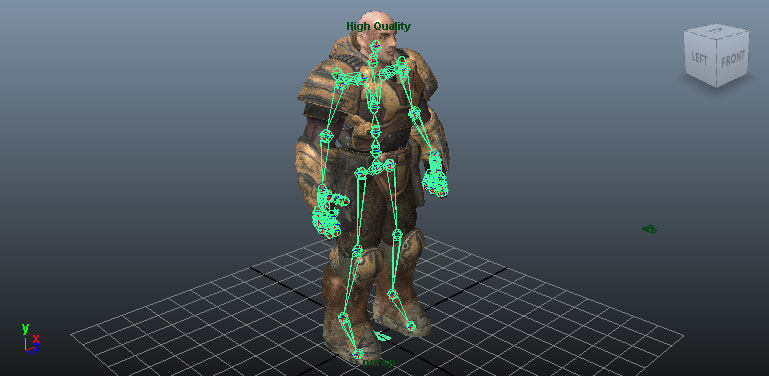
Rigging - As you can see from the picture there is a skeleton rigging on the object in green lines, this is how an object is animated, animating the parts of the rigging that then goes on to move the corresponding body parts. Rigging is relatively easy for a human character as you add lines where bones would be, however other objects or assets may be harder to rig as their structure will be different to a human, for example a car.

Box modelling is when you take an ordinary shape such as a cube and use it to create something else, as you can see here in this image you are able to take a simple cube and extrude and change it into the object that you want. This is then smoothed over with the smooth mesh tool to give it that realistic look instead of the blocky outcome.


Image result for box modelling

3D development software

When saving assets in Maya you end up with a .mb file type, which is only accessible on Maya, however is normally a small file type, so will not take up much storage space. Other software such as 3D Studio Max has its own file type also, which is 3ds. Again this is a file type that can only be accessed on that software, but it is able to be rendered/optimised and converted into a different file type, or it is able from Maya to be sent straight into unreal with a drop down option making it easier to send over assets into your environment.

Constraints

Polygon Count - As mentioned before polygon count allows for a much better detailed asset than an asset with a low polygon count. This can be considered a constraint as sometimes it is hard to add more polygons to an object, therefore making it harder to give it a detailed look. Another constraint is how long rendering takes, which depending on the size of the asset and the amount of polygons in the asset determines how long rendering will take which is normally a long time.

Tuesday, 4 October 2016

Unit 70 P1 P2 - Gaming engines


Unit 70 P1 P2 - Gaming engines

What is a game engine?

A game engine is a piece of software used in the creation of a video game. An example of a game engine would be R.A.G.E, the game engine that is used to create Grand Theft Auto and other Rockstar exclusive games. This is primarily a 3D engine, used for graphic intensive games and has quickly become one of the most advanced engine to date. An example of a 2D game engine is Game maker studios, which has the ability to create 3D games but is built to create 2D games. A game engine helps to create all the components of a game and put them together in order to create the game, these include the objects, characters, weapons and environment used for the game. Alongside being used to create games, Engines have also been known to help create mods for games, which edit some of the core features of games to change or add new things, this normally being done by fans of the game who want to see changes to the game such as different skins for characters or new objects that add new life to a game. A game engine contains the core components of creating a game, such as the character generation and environment creation, however navigating through the intense and advanced UI can become hard and therefor takes some time to get used to.


Physics

A physics engine is used in most game engines to create body movement, collision in a game between two objects. Physics in a game normally abide by the physics that are also in real life, for example if a person jumps they will come back down to the ground due to gravity.

Rendering

Game Rendering allows the user to see what is in the world/game. Each engine has its own way of rendering, some being more advanced than others which results in a better quality of the models used. For example Frostbite 3 (EA engine) uses a powerful rendering system which allows for photo realistic models to be viewed in a game.

Closed and open engines:

A closed game engine means that the engine can only be accessed by members of the company that own the engine, or those who are trusted enough to use it. An open game engine however is open to the public, either for free like MAYA or costing like Unreal Engine, both are good game engines and do the same as the closed engines but have the difference of being able to be used by the general public.


Examples (closed engines):

Frostbite (EA):


Frostbite is the exclusive closed engine for the gaming company EA, it is the engine used to create games such as Fifa, Battlefield, Need for speed, Mass effect and Medal of honor. Arguably one of the best game engines to date, Frostbite is one of the most technically advanced engine's which produces some of the most graphically perfect games on the market. However being a closed game engine means that to work on this engine would require you to work at EA, otherwise you cannot use it.

Now being known as Frostbite 3, first used with the game battlefield 4 the engine has undergone a few changes in order to improve the issues and improve the engines overall quality. Now also being adapted to work as a mobile engine device with Frostbite Go, a new engine that will allow EA to create mobile games too. The unique tool set that Frostbite uses is made up of 3 primary components, these being FrostEd, Backend services and Runtime.

FrostEd is a desktop program used by Artists, designers, Animators and programmers at EA. FrostEd uses a unified interface that allows everyone using it to be creative, and efficiently build high quality products/games.

Backend is the data storage system that Frostbite uses, being able to handle hundreds of thousands of data packets and assets to be stored, this allowing EA to create various game assets at the same time and not worry about storing them before they are optimised in order to reduce space. Within this EA has systems called blizzard and avalanche which handle the storage and the caching of the data, with daily updates to keep the system up to date.

Runtime is what allows EA to diversify their games and code them so that all platforms are able to run the game, this being the final process in the Frostbite engine, allowing games to be compatible with the various platforms such as XBOX 360 and now the next gen being XBOX One and PS4.

Fifa 17

Need For Speed 2015


Battlefield 1


Rage Engine (Rockstar):


Rage stands for Rockstar advanced game engine, created by Rockstar in order to further their game quality for certain franchises such as Grand Theft Auto. First created in 2006 the Rage engine changed the quality of Rockstar games significantly, now producing games with photo realistic graphics that allow the users to fully immerse themselves in the game. Like EA's Frostbite engine the Rage engine is only exclusive to Rockstar employees, meaning it is a closed game engine specifically designed for Rockstar and Rockstar alone. With recent releases such as Max Payne 3 Rage has been compatible with Directx 11 and 3D rendering programs allowing for the best quality in games on the PC platform. This is due to the fine tuning that took place over the recent years whilst Rockstar created GTA 5, allowing for the specific changes to be made in order to create a realistic life like game environment for their games.

Rage uses the Bullet physics system created by erwin coumans, This is what allows GTA to have the realistic physics in game such as collision between cars, people when fighting and gravity when planes are shot down. Bullet has been used in multiple other games such as Trials HD, Toy story the game and diRT the racing game, also being using for visual effects in the films sherlock holmes and hancock.


Grand Theft Auto 5


LA Noire


Red Dead Redemption


Operation arrowhead engine/Day Z Standalone Engine:

Starting off as a mod, Day Z become its own game, however the engine used for the standalone game was taken from the original engine used to create the base game arma 2 which day z the mod was created off of. Now being updated to meet the needs of Day Z by Bohemia interactive who now own the rights to the game, the engine works specifically for the game and is a closed game engine, however the Arma 2 engine is able to be accessed. This primarily being accessible so that content creators are able to mod the game and create add-ons. 

Until 2015 the engine used was virtual reality which as mentioned was the Arma 2 engine, now bohemian who have taken over the production of Day Z have started using their own updated Enfusion engine. This was greatly appreciated by players of the game as it allowed for a more fluid movement and physics system for when characters performed actions or when they collided with objects such as stairs, which previously would make the character bob up and down awkwardly.

This engine is not as advanced as the Frostbite or R.A.G.E engine however it still uses similar features to both of these engines, such as a physics engine and a rendering engine capable of HD image rendering allowing for games to have a crisp photo-realistic look. 

Arma 2

DayZ (The mod)


DayZ Standalone


(Open Engines)

Unreal Engine:

Unreal engine is an open game engine created by EPIC games. Providing users with the appropriate assets in a large library for free, it isnt hard to find scenery, objects and characters that can be used for your games. The engine uses direct X 11 and 12 Rendering which allows for their games to make use of dynamic lighting, light reflection and HDR full scale scenes. As well as dynamic lighting, Unreal uses cascade visual effects which allows the creation of movie quality effects, allowing the creator to add various detailing such as fire smoke and dynamic particles.

Thanks to the unreal engine gameplay framework, artificial intelligence is made easy and also works more fluidly with AI having spacial awareness, allowing for them to judge a situation better and being able to navigate without bumping into walls or other objects. The user interface for Unreal is friendly, and allows an instant game preview in the centre of the screen, allowing for the user to edit things in the game such as buildings, characters or scenery and then simply click the play button to test it to see if it works to their satisfaction. This feature makes testing game easy, allowing for each scene to be tested properly to see if it works all to the users needs.

Unreal has had multiple versions throughout the years, now being known as unreal engine 4.13, there has been 4 versions of the engine, with more updates being added every so often to keep the engine up to date. 

Unreal Engine 1:

First created in 1998 with the game Unreal, the engine was capable of creating 2D and 3D games, however not being able to create as HD environments or large as what it is capable of now. Using the Glide API this engine had good rendering paths for its time, and was later updated for Open GL and Direct 3D.

Unreal Engine 2:

Being released in 2002 with the game Americas army Unreal engine 2 was the updated version of the first engine, being able to produce much better quality games thanks to the new physics engine used which was the rag-doll engine. Still using relatively the same rendering tools as the first engine, the look of the games had been improved slightly but not dynamically. During an update to Unreal 2.5, the engine had improved rendering allowing for better game quality and vehicle physics.

Unreal Engine 3:

Unreal Engine 3 was created in 2004, after the success of unreal engine 2. Being able to use shader hardware it allowed for light to be done per pixel as opposed to per vertex, which improved the immersion and the quality of the light in games. This changed the overall look of games created using unreal 3, one being bioshock infinite which used a photo realistic style. Also having destructible environments and soft body dynamics. As well as being a game engine, UE3 has also helped to create sets and backgrounds for the show lazy town, and has been known to create various visual effects for films and other tv shows.

Conclusion

In my opinion Frostbite or Unreal is the best game engine at this current time, the reason i have chosen 2 is because of how Frostbite is only EA exclusive, so i am not able to work on it unless i have a job at EA. However the technically advanced edge of the Frostbite engine is what puts it at the top of the list, with its storage capacity, and its HD image creation capabilities. Unreal is also at the top for its technical edge, being updated over many years now to create the perfect game engine which has my favourite feature which is the game preview screen that allows for specific scene testing which is helpful as it allows you to edit anything that isnt working properly at that current time instead of waiting for it to be properly tested by other people. It also allows you to see how far along you are in the creation process, and with its soft body animation capabilities i feel that unreal engine is able to create some of the most fluid and graphically pleasing games.