Friday, 24 February 2017

P3 Understand how media audiences respond to media products

Unit 6: Critical Approaches to Creative Media Products

There is a common belief at the moment that violent video games cause violence in the real world within teenagers-kids. It is true that in the recent years and development of video games some games have become more violent, game titles such as GTA 5, DOOM and Hitman. Each game revelling in the opportunity to show a realistic violent scene ranging from shooting someone to beating someone with a bat. This discussion about whether games do effect a persons mental reasoning however does not have much evidence to support the claims and is instead more based off of theories and minor cases of violence. 

The main argument is that videos games do effect people, however through the various studies by professionals there has not yet been conclusive evidence that they do, instead there is more of a link to video games causing people to be more aggressive and or DE-sensitised to violence. Through a survey that I constructed i was able to find out myself from teenage gamers their opinions to this subject, asking questions that would allow me to see if they had been effected by video games in some way. 


As you can see from the screenshot above my survey questioned ths theory about de-sensitisation due to violent video games and the results were bias towards people feeling like they had been de-sensitised. However what does this mean? This does not prove the theory that video games cause violence, it merely advances the theory that it can desensitise someone to violence due to them. This does not directly correlate to the action of violence, to give context it applies more to the theory of violence, as seeing and doing are two different things. The aim of this question was more aimed however at whether people understood they were desensitised, and doesnt prove whether or not the recipients of the survey are infact desensitised which leaves this as only speculation. What it does however is showcase whether people understand that they are desensitised or whether they feel it, which is beneficial to know as it can then help them to deal with being desensitised. 

Does knowing you are desensitised actually mean anything? Yes I believe so, speaking about the discussion from my point of view i believe that knowing you are desensitised makes you view violence differently to others, not in a sense of satisfaction at it, however it allows you to notice violence much quicker and therefor judge the course of action much better. The action which then follows has other variables that take place when performing the action, such as personal experiences, mental state and environment. All of which differentiate between people making it hard to conclude whether it does effect people or not.

Something that would support the claim against violence due to video games would be the beneficial side to gaming, the skills picked up. A lot of games require precision movements and decisive decision making, which can come in handy to people going into careers that utilise this skill such as doctors. One game known as surgeon simulator allows the player to practice surgical tasks which if carried out incorrectly will result in the patient dying and the objective being failed. As the primary function within games is to complete the objective and in most cases to the best of the players ability it is unlikely that players will actively fail on purpose. The hyperdermic needle theory can be applied to this, as it suggests that information is accepted by the player directly and in some cases unknowingly. This teaches players some basic skills which can then be transferred into jobs such as becoming a doctor. Infact it is becoming more of a normality that people who do play video games find it easier to transfer their skills from the games into real life situations such as doctors operating as said here http://www.digitaltrends.com/gaming/surgeons-play-video-games-to-prepare-for-surgery/. 


Image result for key hole surgery game

Again however it is hard to use evidence such as this to conclude that video games do or dont cause violence, however it has given a beneficial look at video games. In conclusion i believe myself that video games are not a root cause of violence, which has been a part of human life since human existance. I believe however that society has come to a more civilized state that when small acts of violence which are hyped up by the media people react with much more disgust as it is no longer the norm, which back in medieval times violence was a much more common and accepted thing. I feel like video gamers are targetted as it is the easy option, when judging someone for why they have acted violently it is better to asses all the possible reasons instead of latching on one, would a footballer who was violent be analysed and it be concluded that because of his hobby of football which can become physical be the cause? Most likely not, I think it is more likely that the mental state, and the upbringing of a person will define their actions, not their hobbies or interests. 

Unit 71 - Object Orientated Design For Computer Games

Unit 71 - Object Orientated Design For Computer Games


Concepts and principles:
- Simplified understanding - relating to blueprinting it is when a blueprint is made and made as simple as possible so that it is easy to understand. For example if there was blueprinting for a character to make him walk, simplified understanding would be when the blueprint of this would be simplified so it is easy to understand and know what it is. This can even simply be just naming the blueprint the name of the action that it carries out.

- Re usability - Re usability refers to re using an object in a game more than just once. Objects that this is normally done with can be things such as multiple cars, or trees/the environmental objects. This can also be in terms of code/blueprints that are used multiple times, such as a piece of blueprinting that allows a character to pick something up, this saves time and makes it easier to create the process which will be used a lot of the time.

- Maintenance - Maintenance is when you fix any errors and simplify the code that is there in the game so that it is not only easy to understand what blueprint does what, but allows you to know what has gone wrong. For example the character is walking jittery, the problem would be found within character animation, it also is a way for you to go in and edit/change the code whenever needed.

- Efficiency - Efficiency can be how well a piece of blueprinting works and how useful it is in your project. Efficiency can also refer to how efficient the creators time is, making time plans for creating certain elements of a game. For example, giving yourself a week to create a character and setting realistic time periods for when it needs to be rigged and animated, allowing you to work out a rough estimation of when parts of the game will be done. This can be then used to plan for the creation of something else down the line.

- Real World modelling - Real world modelling is the art of creating something that exists in the real world, this can be created off of drawings of the object such as a car like an Audi, or a photo of the car. When this is done the model is supposed to be an exact copy, or in some cases is modified for the games benefit, such as theme or look of the object. For example an apocalyptic game will have a car with rust or maybe has been modified with guns on and more armor.

- Collaboration and sharing - Collaboration and sharing can be when different members of a project all working on a game work together to achieve the completion of the game. One element of this is between a game artist and a game designer, the game artist will create the models and assets, which will then be animated and coded by the designers. There is many more parts to a game creating team, however these are just two.

- Quality assurance - This is the checking of the game throughout the process of creation, and making sure that each part of the game works in harmony with its corresponding features, whatever they may be. It also refers to a certain standard that is to be kept throughout, when being tested it wont pass merely on the action or object working, but also being up to the standard marked out at the design process. For example an object will look like its concept art, or have the style intended such as cel shaded or photo realistic. Testing should be done throughout to make sure that no problem is missed and causes a bigger problem down the line.

Game objects
- Sprites - Sprites, normally used for 2D games, are what make up things such as characters, enemies or weapons. Sprites form almost everything and anything in a game, and are normally created in pixel form. A game known for using sprites is super mario.

- Characters - Characters are found in almost every game, the word character in terms of a game normally refers to the person you are playing as, however can also be used to describe an enemy or ally. They take the form of people, or even animals that are within a game.

- Weapons - Weapons are within a game to be used against the enemy of the players characters or to be used by the enemy. A weapon in a game can take many forms, but are known to cause some form of damage to characters and/or objects within the game. A gun, or knife would be considered a weapon.

- Rooms - rooms can also be called levels, they signify a change of location or area and are normally made seperately. In some games a room can be when the character enters a house, giving him a cutscene or a jump to the next area/inside the house. Some games have many rooms, other games such as open world games have fewer.

- Walls - Walls keep the player in a certain area, normally having a collision box linked to the player to stop them from going past it.

- Scenery - Scenery adds life to a game, it builds an environment or location. Scenery can also be in many forms, such as trees, a river, or buildings that have no impact to the game, and only serve the purpose to make the game more immersive for the player.

- Rewards - Bonuses - Power-ups - These all fall under a similar catagory, they all boost something within a game/effect something. A reward is when the player has done something good, such as reach the end of the level they get extra points. A bonus can be in the form of extra gold coins for the player, and a power-up normally enhances the players abilities, in some cases making him invulnerable to attacks which in most cases benefits the player.

Object properties

- Object properties are normally linked to one object and vary from object to object. Colour will almost definitely be different from object to object, but in some cases will be reused. Object sizes vary upon how big they are to be, most objects are normally re-sized to coordinate with the player, for example a mouse object will not be bigger than the player unless it is meant to be bigger. Speed and movement is also something which is defined by the object that it is meant for, some enemies for a game may be much faster than others adding a challenging element to a game. Sound is dedicated within games to either alert a character to something, or to add further detail to an object such as a sliding door. Adding the sound effect to a sliding door adds immersion to the game. Health and lives are two different things however result in the same outcome if both are reduced to 0. Health is used in some games and can range from numbers to a bar of health, damage done to the player is taken directly from the health and can vary in the amount that is taken depending on the type of attack/damage dealt. In some cases health can regenerate or be restored by power-ups/rewards. Lives are more like chances, if you have 3 thats 3 chances to complete the task, these also can be replenished in some cases and when they are all gone you have run out of chances and the game ends.


Actions and events

- Actions and events define what a character is or isnt able to do. These can range from an attack animation, to a movement animation when a key is pressed. These are called keyboard events, when a character is moved by a keyboard press it is known as an event as it is something that is happening within the game.

- Collision - Collision is between two objects, but not every object. Some objects do not collide, such as a ghost perhaps that has no physical form. However anything physicaly in a game will most likely collide with another object, the main form is a wall and other moving objects such as a ball. The ball if it has collision on with the wall will not be able to pass through it and will most likely bounce off or collide with it and be still.

Inheritance

- Inheritance allows for the creator to reuse code or sprites from other objects but with the ability to change certain features. The parent is the object from which the code and design is from, and the child is the object that it will effect/be given to. Things such as cars that do the same task however look different may use inheritance, with a red car being the parent and the different coloured cars being the child. inherited behaviors means that the child will normally act the same as the parent, as its code is similar if not the same as the parent.

Thursday, 26 January 2017

Portfolio

Charlie Long - Game Art Portfolio


Since a young age I have held a keen interest in video games and how they work, for the past few years I have been working on developing my drawing and digital skills in order to create pieces of work that can one day be used in a game.

As of the past year (2016-2017) I have been working on a project to create a 3D game for my college using software such as Photoshop, Maya 2016, unreal engine 4.12.5 and Autodesk mudbox. Here is some of the design process ranging from a few pieces of concept art to fully created digital objects:

Perspective Drawing


Killer Klownz From Outer Space Project

Concept Art


Digital Work - Killer Klownz Game


Random Doodles/Other Projects


Spaceship Project

Concept Art


Wednesday, 25 January 2017

Unit 66 - 67 3D Modelling Assignment 3 – Be able to create 3D models following industry practice


Human Character Model


In order to start the creation of a 3D model a reference image is needed to help construct a model with respective proportions that are realistic, and therefore an image plane is created which provides the modeller to have a 2D image on the Maya workstation that they can work off of. Here you can see my image plane as a reference, created by going into the create tab and adding a photo from file that i had already collected.

Using a cylinder polygon and adding subdivisions to turn it into a octagonal cylinder which is much easier to work with. After doing this i then matched up the outline of the polygon to the reference image to get the correct height for the torso.


Using the scale and move tool i then moved each row of vertices of the octagonal cylinder to match up to the dimensions of the reference image, this forming the torso of the character.


Once the torso was finished I then moved onto the arm, which was done using the same method as the torso, yet being resized to match up to the reference images proportions. The only difference with the arm and the torso in terms of being a polygon other than the scale, is the added two rows of vertices to allow for the arm to be more detailed.


Next i made sure that the arm was in the correct place, and deleted the top row of faces from it, this is where the shoulder would normally be. However in order to connect the arm to the shoulder you have to extrude the faces from the side of the torso to create the shoulders and something for the arm to connect to.


Here is the faces of the torso being extruded to their position. By extruding the faces twice, it creates enough verts for their to be a perfect match up between the arm and the torso/shoulder.


I then combined the meshes together once in place to turn them into the same object, but then however used the welding tool to add the vertices of the arm on the top to the bottom vertices of the shoulder in order to connect them as one object.


As you can see here i have also resized the shoulder so that it has the realistic proportions like the image reference. This was done by using the move tool and moving the vertices on top of the shoulder to the correct area, also rounding off the top of the shoulder.

Once i had completed the arm, i moved onto the leg which again was created in the same was as the torso and the arm, using a move tool to match up the vertices to the image reference.


You can see here i connected the leg to the lower portion of the torso, thus forming the pelvic region. This was again done in the same way as i connected the arm to the shoulder, using the welding tool.


After finishing the leg i decided to mirror the body so that i could see a full body, a trick used to make sure that the left and right side of the body are symmetrical without having to make both sides separately.  To do this i went into the mesh tab and chose mirror geometry whilst having my mesh selected.


Here is the mirrored piece, sometimes you may have to adjust the geometry however as it does not always match up to the reference image.


Once i had mirrored my body i then started work on the hand, which is made from a square re-scaled and having 4 subdivisions in height and weight to allow me to extrude the fingers from the faces.


After extruding the fingers on the hand i then matched it up to my reference image as best as possible ready to connect it to the arm/body.


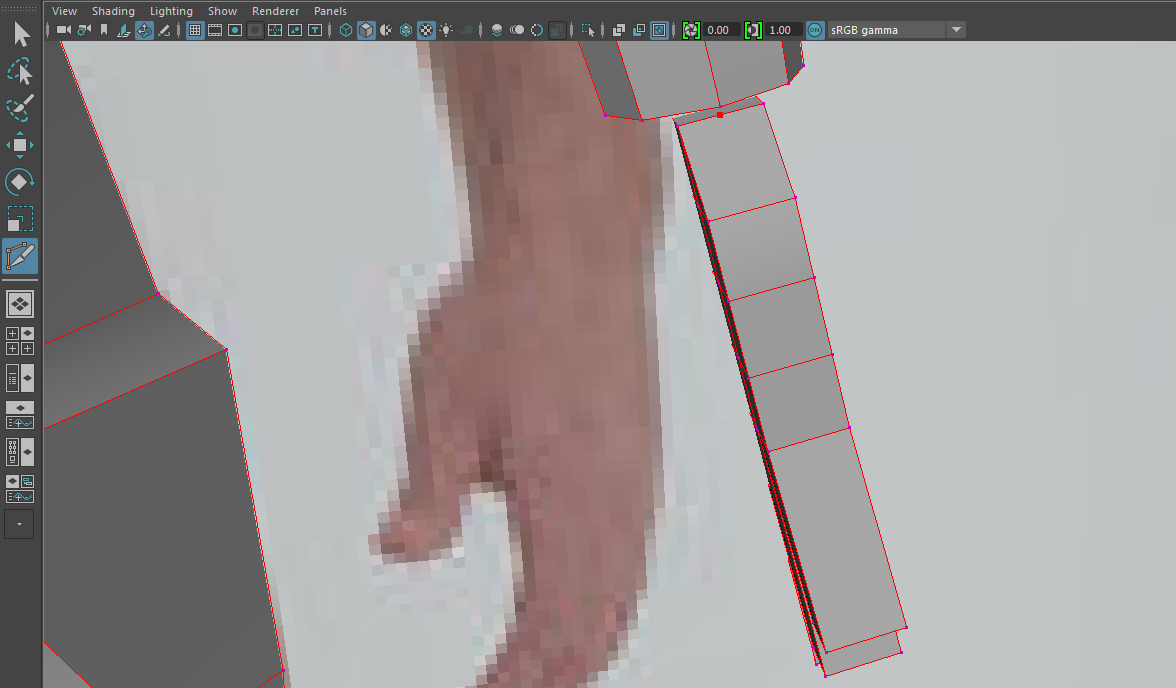
 By adding another vertex using the bevel tool i was able to connect the hand to the arm like i connected the other body parts, using the weld tool.


 The same was also done with the feet, modelling them off of a square that i had extruded at the ends in order to create the toes then elongated in order to produce some long clown feet.
For the head i used a cylinder like i used for the torso, however moulded it by extruding the faces at the bottom to create a long chin, with the head however one i had connected it and was done, turned it along with the rest of the body into a smooth mesh, this making the model look a lot better as it has the realistic smooth texture/sculpt that a human would have.


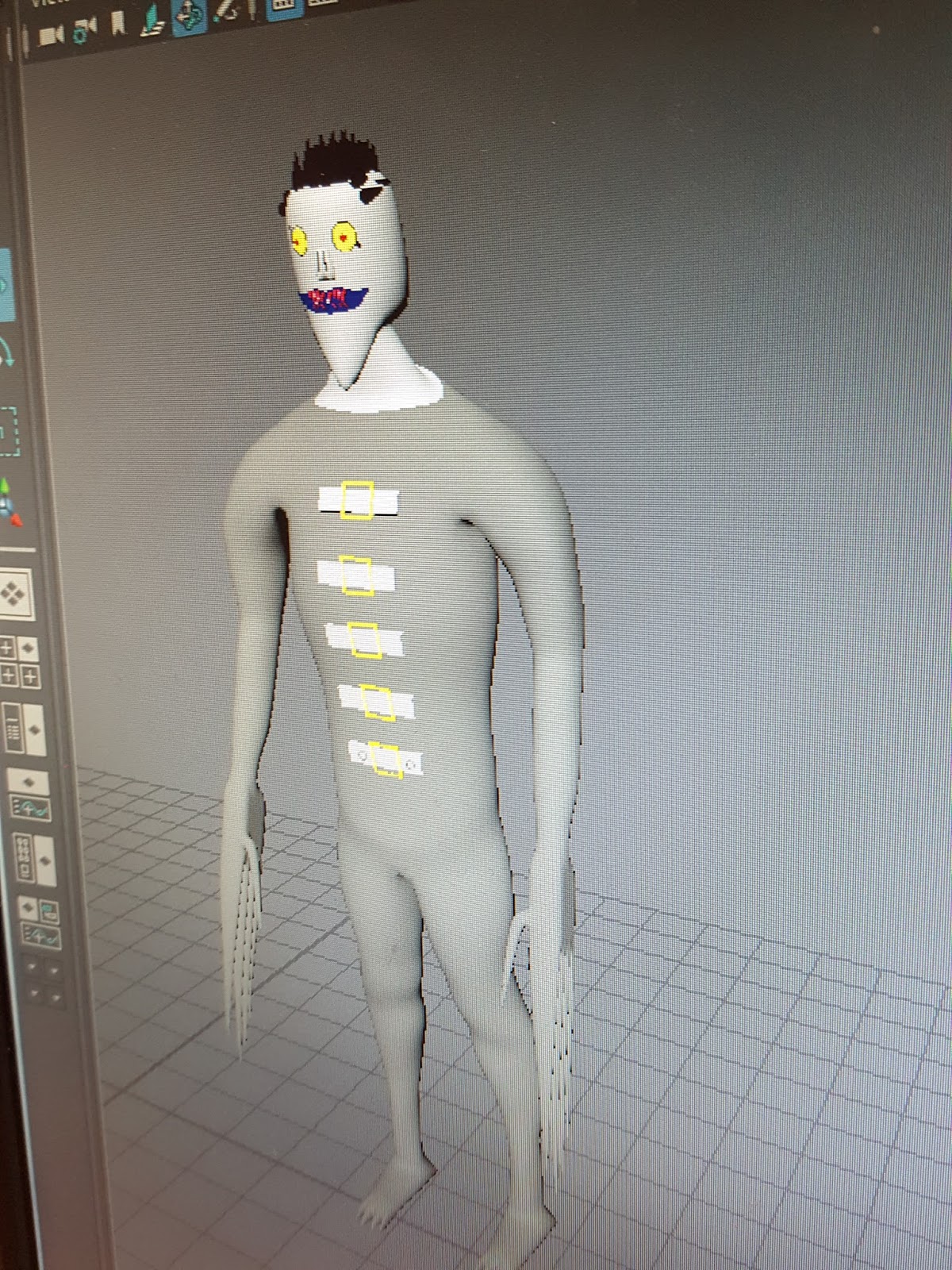
The final product that I ended up with was a clown that will be used in my game, i have elongated his fingers to simulate knives and also placed him in an orange jumpsuit to represent him being a prisoner that was once human, but has since been turned into a psychopathic clown who is on a murderous rampage. I am happy with how the initial model turned out, as it replicated the look i aimed for. I wanted to create a large lanky clown, that would tower over the normal player, in order to do this i raised his height in comparison to the initial reference image to make sure he was tall with the scale tool. The structure of his head represents a typical clown look, through the extrusion of his chin making it longer than that of a normal person. The art style is cel shaded like my game and was done through changing the colours on the specific faces of the model, such as the torso/arms, hands, head and feet to create the clear sections of his clothing. If i was to re do this character i would most likely spend more time on his head, as that is the most basic part of the model and does not have too much detail. Adding more detail would overall improve the model and make it look more realistic.